# Tomb Viewer
## 🪦 MVP Tomb Viewer — Top Damage + Drop List
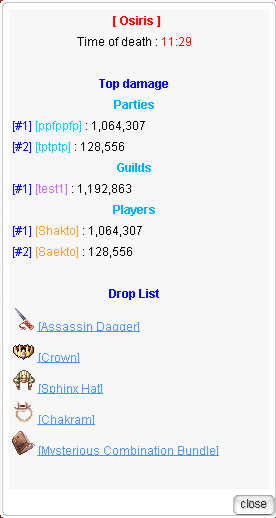
The **MVP Tomb Viewer** enhances the default rAthena MVP tomb system by providing a clean and detailed interface that displays **damage rankings and complete drop information** when interacting with an MVP tombstone.
When an **MVP monster dies**, a tombstone is created. Players can click the tomb to view detailed information about the kill.
***
### 🧾 Tomb Information Display
When interacting with the tomb, the interface shows:
#### 🐉 MVP Details
* **MVP Name** (highlighted)
* **Time of death (UTC)**
#### ⚔️ Top Damage Ranking
Displays the **Top 5 players who dealt the most damage** to the MVP.
Information shown:
* Player character name
* Total damage dealt
* Numbers formatted with **thousands separators** for readability
#### 🎁 Drop List
Shows the **complete list of items generated from the MVP kill**, including:
* Normal monster drops
* Looted drops
* MVP reward items
Each item entry displays:
* Item **icon**
* **Clickable item link** (via `create_item_link_for_mes`)
* **Quantity**, when applicable
***
### ✨ Features
* Clickable **MVP Tomb UI**
* Displays **MVP name and UTC time of death**
* **Top 5 damage ranking** (aggregated by character)
* **Complete drop list**
* Shows:
* Normal drops
* Looted items
* MVP reward items
* **Item icons**
* **Clickable item links**
* Data snapshot saved per **tomb NPC ID**
* Data automatically **cleared when the tomb is removed**
---
# Agent Instructions: Querying This Documentation
If you need additional information that is not directly available in this page, you can query the documentation dynamically by asking a question.
Perform an HTTP GET request on the current page URL with the `ask` query parameter:
```
GET https://xenaro.gitbook.io/xenaro/feature/server-feature/tomb-viewer.md?ask=
```
The question should be specific, self-contained, and written in natural language.
The response will contain a direct answer to the question and relevant excerpts and sources from the documentation.
Use this mechanism when the answer is not explicitly present in the current page, you need clarification or additional context, or you want to retrieve related documentation sections.